
Accessibility Testing That Runs on Every Push (Not Once a Year)
Part of Building This Site and Small Business Websites
By Paul Peery · August 2, 2026 · 3 min readUpdated August 13, 2026
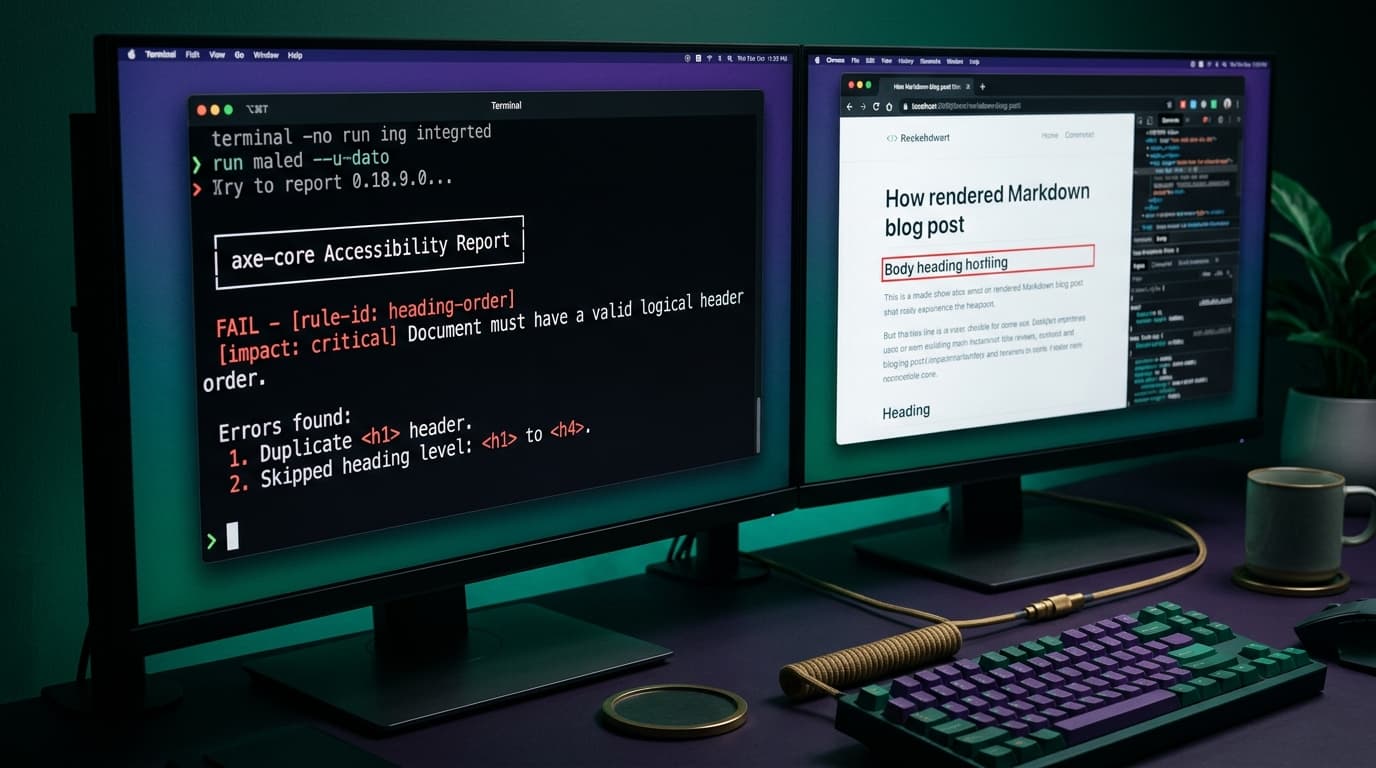
Most accessibility work happens as an audit—someone runs a scanner once, files twenty tickets, and six months later the site has regressed to exactly where it started. The fix wasn't more auditing. It was making the scan a gate: every push, every page, fail the build on a violation.
Here's the setup I actually run, and the honest scorecard.
The wiring
The site already had end-to-end browser tests in Playwright running in CI on every push. Adding accessibility to that was one dependency—axe, the same engine behind Lighthouse's accessibility score—and one spec file:
- A list of every public page: home, blog index and a post, tag and category pages, deals, topic hubs, search, services, the intake form, legal pages.
- Plus—and this is the part most setups skip—the signed-in pages: the member account page and the admin panel's dashboard, editor, settings, and health pages. The tests authenticate once and reuse the session. Your admin deserves the same bar as your homepage; you use it more than anyone.
- Each page loads, axe injects, and any violation fails CI with the rule name and the offending element.
On top of axe's defaults I enforce two structural rules it treats as optional: every page has exactly one h1, and heading levels never skip. Headings are the skeleton a screen-reader user navigates by; a page that jumps h1 → h4 reads like a book with chapters missing.
One implementation detail that matters in a framework like Next: wait for hydration before scanning. Half my early "failures" were the scanner racing the JavaScript—the suite now waits for an explicit signal the page is interactive before asserting anything.
What it has actually caught
This gate isn't theoretical—real catches from this codebase:
- A second
h1. Post bodies are Markdown, and a hand-written# Headinginside a post compiles to anh1—on a page that already has one. The fix wasn't "remember not to do that": the Markdown renderer now downgrades anyh1in body content to anh2. The rule made the fix structural. - Dishonest
aria-current. My nav marked the "Blog" link asaria-current="page"on every blog post—telling a screen reader the link you're hovering is the page you're on. Sighted users saw a reasonable underline; the announcement was a lie. Exact match now announcespage, section ancestors announcetrue. - Redundant alt text. Post-card cover images once had
altequal to the visible title right next to them—a screen reader read every card twice. Decorative images now carryalt=""on purpose, which is not laziness; it's the correct signal for "skip this." - Unlabeled interactive bits on new features before they shipped—the scan runs on the pull request, so the fix happens while the code is still warm.
What it cannot catch: be honest about this
Automated scanning covers maybe a third of accessibility, the mechanical third:
- It verifies a focus style exists, not that keyboard order makes sense or that a dialog traps focus correctly.
- It measures contrast, but not whether your error states rely on color alone in a way that's confusing in practice.
- It cannot tell you the experience of hearing your page read aloud—the difference between technically-labeled and actually-usable is a human judgment.
So the gate's real job is narrower but still valuable: it makes the mechanical floor permanent. You fix an issue once and it can never quietly return, which frees the human attention for the parts that need it. Occasionally I still tab through new flows with the keyboard and listen to a page with a screen reader—the scan just guarantees I'm not re-finding solved problems.
Why a gate beats an audit
An audit is a snapshot; a gate is a ratchet. The scan runs alongside a few hundred other tests on every push, so accessibility regressions cost the same as any other failing test: the merge blocks, the fix happens now, nobody schedules a remediation project. For a solo builder that's the only version that survives contact with a busy month.
If you want the checklist version for a site you run—five checks a non-developer can do today—I keep the practical basics in my client work too; that's part of what a build from me includes out of the box. More engineering write-ups from this site live under Building this site.
Keep reading
All posts
Five Accessibility Checks You Can Run Today Without a Developer
You don't need a lawyer or a rebuild to spot the barriers that lose you customers. Here are five practical checks a non-developer can run this afternoon with free tools.
August 13, 2026 · 5 min read